 |
FanMeter
The GUI componente FanMeter symbolises a fan, that can automatically be animated. For this purpose FanMeter implements a component, which is the interface Animateable and especially intended for animated components. Adding a FanMeter object to an AnimationContainer will cause the FanMeter to be animated automatically.
|
The FanMeter is equipped with a display for decimal values and may receive an additional caption. Table 6 lists the accordingly available methods. The fans animation only starts, if the displayed value is greater than 0.
| Method | Description |
FanMeter(int x, int y) | Instantiates a new FanMeter at the specified position. |
animate() | Animates the fans blades for the impression of a spinning fan. This methode can be invoked by an application, but should normally be left in control of an AnimationContainer. |
setCaption(String caption) | Provides the FanMeter with a caption, which will be displayed on the rigth side of the fan image. |
setNumericDisplay(int digits, int decimals, String unit) | This method configures the alphanumeric display of measured values. Parameter digits defines the total number of displayed digits, decimals specifies the number of decimals included in digits. Example: digits=4 and decimals=3 will display values in form of x,xxx. If decimals=0, no decimal point will be displayed (useful if the measured value shall be displayed in a different range of values). The parameter unit holds the unit of the displayed values (e.g. "RPM"). |
setValue(int value) | Passes a new value to the FanMeter, which thereupon will be updated. |
Table 6: Methods of class jcontrol.ui.vole.meter.FanMeter
The program example listed below demonstrates the usage of the GUI component FanMeter in connection with an AnimationContainer. Thh latter only differs in few points from a normal Container, automatically recognises animateable GUI componentes and creates a process, which continuously invokes their method animate, after those components are added to the AnimationContainer. The programmer is provided with two additional methods by the class AnimationContainer:
| Method | Description |
setAnimation(boolean animate) | This method is used to (de)activate the animation of the animateable GUI components, contained in the AnimationContainer. |
setAnimationInterval(int interval) | Adjusts the speed of the animation. The time span between two steps of animation is givenby interval (in milliseconds). |
Table 7: Methods of class jcontrol.ui.vole.AnimationContainer
Besides the additional functions for animated Gui components, the AnimationContainer behaves just like a usual Container. Animateable GUI components like the FanMeter may also be added to a Container, it won't be animated though. Components that are not animateable can likewise be added to an AnimationContainer.
Open the VoleFanMeterExample in your JControl/IDE and start the simulator. You will be presented with an image similarly to the one shown in figure 6, except that the fans are spinning.
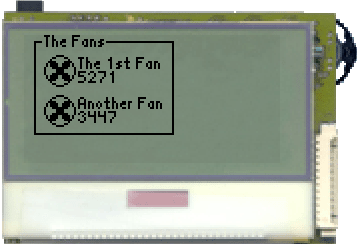
Figure 6: The VoleFanMeterExample
| 1 | import jcontrol.lang.Math; |
| 2 | import jcontrol.lang.ThreadExt; |
| 3 | import jcontrol.ui.vole.AnimationContainer; |
| 4 | import jcontrol.ui.vole.Border; |
| 5 | import jcontrol.ui.vole.Frame; |
| 6 | import jcontrol.ui.vole.meter.FanMeter; |
| 7 | |
| 8 | /** |
| 9 | * <p>This example demonstrates how to use the |
| 10 | * component FanMeter within the GUI framework |
| 11 | * JControl/Vole.</p> |
| 12 | * |
| 13 | * <p>(C) DOMOLOGIC Home Automation GmbH 2003-2005</p> |
| 14 | */ |
| 15 | public class VoleFanMeterExample extends Frame { |
| 16 | |
| 17 | /** |
| 18 | * Create an animateable Fan and add it to an AnimationContainer |
| 19 | */ |
| 20 | public VoleFanMeterExample() { |
| 21 | // create two Fans |
| 22 | FanMeter fan1 = new FanMeter(10, 10); |
| 23 | fan1.setCaption("The 1st Fan"); |
| 24 | fan1.setNumericDisplay(5,0,"RPM"); |
| 25 | FanMeter fan2 = new FanMeter(10, 30); |
| 26 | fan2.setCaption("Another Fan"); |
| 27 | fan2.setNumericDisplay(5,0,"RPM"); |
| 28 | |
| 29 | // create a Border around them |
| 30 | this.add(new Border("The Fans", 5, 0, 70, 50)); |
| 31 | |
| 32 | // create an AnimationContainer and add the Fans |
| 33 | AnimationContainer ac = new AnimationContainer(); |
| 34 | ac.add(fan1); |
| 35 | ac.add(fan2); |
| 36 | |
| 37 | // add the AnimationContainer to the Frame |
| 38 | this.add(ac); |
| 39 | show(); |
| 40 | |
| 41 | // create some random values |
| 42 | for (;;) { |
| 43 | fan1.setValue(4800+Math.rnd(500)); |
| 44 | fan2.setValue(3400+Math.rnd(200)); |
| 45 | try { |
| 46 | ThreadExt.sleep(1000); |
| 47 | } catch (InterruptedException e) {} |
| 48 | } |
| 49 | } |
| 50 | |
| 51 | /** |
| 52 | * Instantiate the VoleFanExample |
| 53 | */ |
| 54 | public static void main(String[] args) { |
| 55 | new VoleFanMeterExample(); |
| 56 | } |
| 57 | } |
Listing 6: VoleFanMeterExample.java


 FanMeter


