A small test program
The usage of the class LM75 will be demonstrated by a small testprogram, which reads the temperature value via this class and displays it on the LCD. The program is very simple and may roughly be described in three parts:
-
The constructor (line 29) creates an instance of the class
LM75, which thereupon is stored in the local variable lm75. The used slave address is set to the deviceAddress stated in line 15. The address (0x90 in hexadecimal) corresponds to the shown circuitry of the LM75.
-
The determination of the measured value takes place in line 35. The value returned by the method
lm75.getTemp() is temporarily stored in the integer-type variable temp. The readout occurs inside of a so-called try-catch-block to catch and displays errors if necessary (lines 34-38).
-
The formatted output happens in lines 39-46. The measured value stored in
temp is displayed via a console (class jcontrol.comm.DisplayConsole) on the LCD.
| 1 | import java.io.IOException; |
| 2 | import jcontrol.comm.DisplayConsole; |
| 3 | import jcontrol.lang.ThreadExt; |
| 4 | |
| 5 | /** |
| 6 | * <p>LM75Test shows how to read the LM75 temperature |
| 7 | * detector class of the jcontrol.bus.i2c library.</p> |
| 8 | * |
| 9 | * <p>(C) DOMOLOGIC Home Automation GmbH 2003-2005</p> |
| 10 | */ |
| 11 | public class LM75Test { |
| 12 | |
| 13 | /** DisplayConsole */ |
| 14 | DisplayConsole console; |
| 15 | int deviceAddress = 0x90; |
| 16 | |
| 17 | /** |
| 18 | * Application Constructor. |
| 19 | */ |
| 20 | public LM75Test() { |
| 21 | |
| 22 | // init DisplayConsole |
| 23 | console = new DisplayConsole(); |
| 24 | |
| 25 | // display startup message |
| 26 | console.println("LM75 Test Program."); |
| 27 | console.println(); |
| 28 | |
| 29 | LM75 lm75 = new LM75(deviceAddress); |
| 30 | |
| 31 | for (;;) { |
| 32 | int temp = 0; |
| 33 | for (;;) { |
| 34 | try{ |
| 35 | temp = lm75.getTemp();//get temperature value |
| 36 | }catch(IOException e){ |
| 37 | console.println("Error: Sensor not responding!"); |
| 38 | } |
| 39 | console.print("Read: ".concat(String.valueOf(temp))); |
| 40 | //temperature resolution is 1/10 centigrade |
| 41 | int whole = temp/10; |
| 42 | int parts = temp%10; |
| 43 | console.println(" = ".concat(Integer.toString(whole)) |
| 44 | .concat(".") |
| 45 | .concat(Integer.toString(parts)) |
| 46 | .concat("\u00b0C")); |
| 47 | try{ |
| 48 | ThreadExt.sleep(500);//do nothing for 500 msecs |
| 49 | }catch(InterruptedException e) {} |
| 50 | } |
| 51 | } |
| 52 | } |
| 53 | |
| 54 | |
| 55 | /** |
| 56 | * Main method. Program execution starts here. |
| 57 | */ |
| 58 | public static void main(String[] args) { |
| 59 | new LM75Test();// start measuring |
| 60 | } |
| 61 | } |
Listing 2: LM75Test.java
Note: The character string "\u00b0C" in line 46 represents "°C". The sequence "\u00b0" is the UTF-8 notation of the degree character. This is used, because some editors modify the (special) character "°" while saving the according file, so that the character will not be displayed properly on a JControl device.
Figure 3 shows the above program while running in the simulator of the JControl/IDE. The temperature value is fixed to 0°, because the connection to the external temperature sensor LM75 can not be simulated. But if everything is working properly, the real measured temperature value would be displayed here.
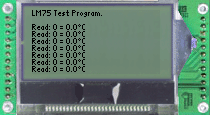
Figure 3: Screenshot of the LM75 test program (JControl/Simulator)


 A small test program


